About once per year, I tweak the design of my website. This typically coincides with the release of a new WordPress core theme towards the end of the year, since there was no Twenty Twenty-Six theme this year, I tried to push my usage of blocks and full-site editing in WordPress to its edge, or at least the edge of my skills. I also opted for a slightly bolder graphical style than previous years.
What are some of the highlights and challenges?
AI design felt generic
Since 2025 has seen amazing AI development, I wanted to see if any of the tools could help me with the design. I first tried to use ChatGPT, Claude, and Gemini for a homepage design, but all three gave me really bland and boring approaches.
Nothing that I couldn’t do myself, and definitely nothing that got me excited. In the end, I asked them which other AI tools besides themselves would help, and Figma AI was one of the options. Here again, I had to prompt quite intently to get something out of it, but it helped me with a colour scheme, and it also helped with some of the main elements on the homepage: the use of photography and the backdrop-filter: blur element.
Duotone cover block
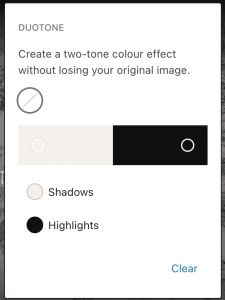
On that homepage, I used the “Cover” block extensively. I took one of my own photographs and inverting the duotone colours; I used a light colour for the shadows and a dark one for the highlights, which created a great effect.
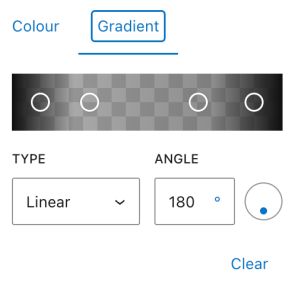
With adding a gradient layover that faded into the background colour, it all fitted in more smoothly. The combination of these two aspects took the one photo and turned it into something entirely different.

Query loop with offset
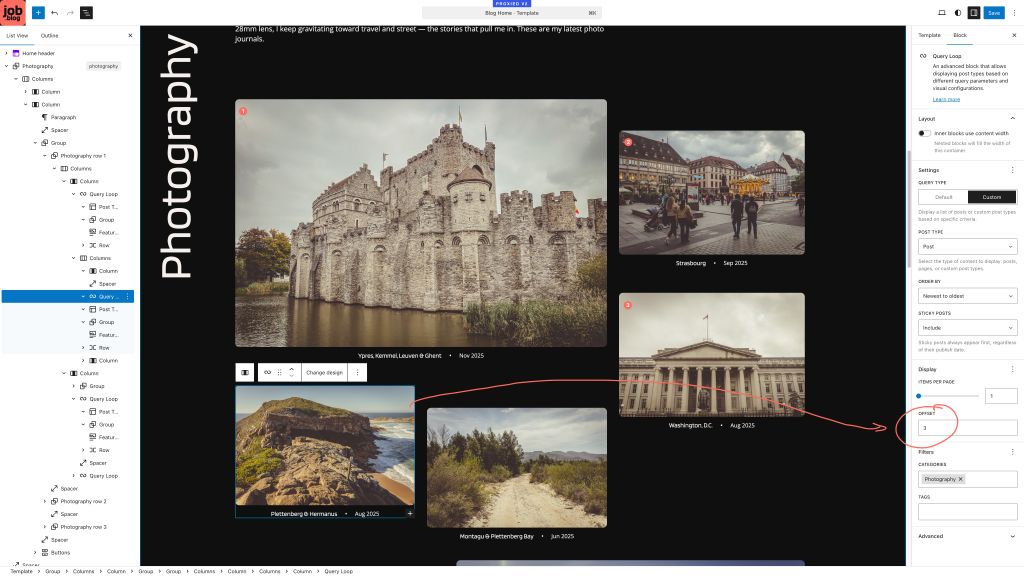
Further, through trial and error, I discovered that in the Query Loop block, there’s a fairly hidden option called “Offset“. It allows you to run a query loop several times on a single page, but if you use it carefully, it means you can create a type of creative grid with posts that still will be showing the latest posts in the right order.
In the example below, for the block selected, I added an offset of 3 because there are already 3 other, more recent posts in the Photography category displayed.
Custom blurring with Claude-generated plugin
Probably Figma’s biggest contribution — next to the accent colour — was the use of blur (CSS’s backdrop-filter). I found it surprising that this was not an option in WordPress core, and contributed to the discussion around it.
That said, I didn’t want to wait until someone else added this feature request, so I first turned to Telex. With Telex, I was able to add a backdrop blur block, but this wasn’t entirely what I wanted; I wanted the blur effect to act on existing blocks like Group and Row.
So, I asked Claude to write a plugin that did exactly this. After about 2-3 tweaks to the plugin, I was able to add this effect to several blocks on my website.

No light/dark mode
While I wanted to also add the option for light and dark mode, I abandoned that idea. The existing plugins in the WordPress.org repo didn’t feel clean, and I had no desire to spend much time on this.
Your thoughts?
Happy to hear any feedback on the site! Especially if you’ve noticed something breaking — or not looking great — I’d love to know!